Help & How-to
Secure, scheduled backups of your Bubble database.
Migrate from Bubble to Supabase
A step-by-step guide to moving your Bubble data into a Supabase (Postgres) database with PlanB — connecting your database, preparing your Bubble app, and reference docs on name normalisation and reserved words.
How to setup Privacy Rules
DO NOT ENABLE “Create via API” “Delete via API” or “Modify via API” UNLESS YOU HAVE A GOOD REASON TO DO SO.
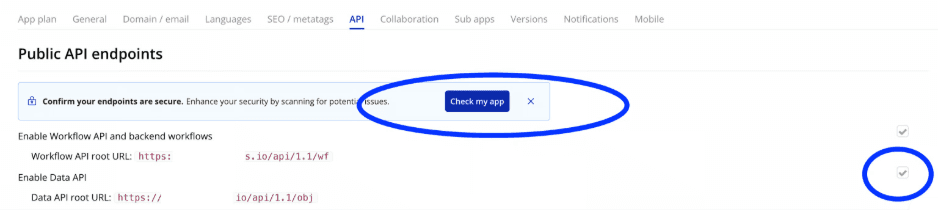
How to check your Privacy Rules
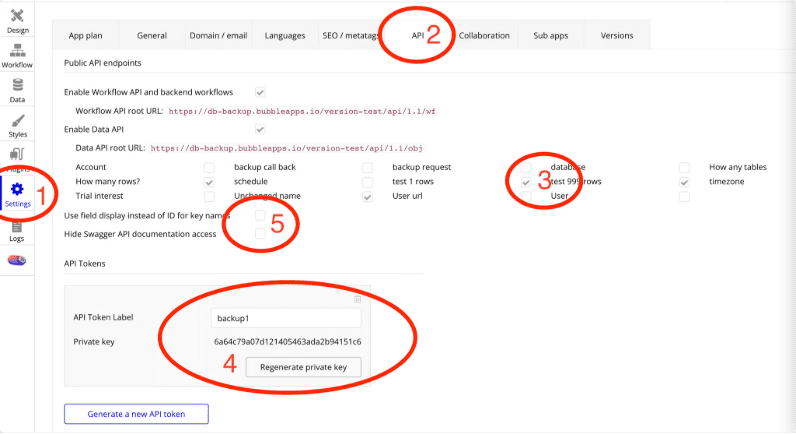
How to enable the Data API

The Data API is only available on paid Bubble plans
If you are on a free plan the Data API is not available, so you can't set up scheduled backups. You can still use PlanB to get reports of your database schema.
How are tables linked when you re-import the data?
Bubble links tables using a Unique Id — you'll see references like 1668162486067x231939114035838980. These are just text in the CSV file. The Bubble database handles linking Unique IDs to the objects in the database automatically.
I want to talk to someone
The best way to contact me is either by email at [email protected] or DM me in the Bubble forum @lindsay_knowcode. You can also use the chat widget in the bottom-right corner. I'm keen to get you up and running.